
Online Rental Management Software: The Owner's Switch Guide

Editorial Staff
Content published by Hemlane is created and reviewed by members of our editorial team, including experienced technical writers and real estate professionals.
Five tools. Five logins. Five places where a lease goes missing.
A listing site. A screening service. A spreadsheet for the books. A payment app. A folder of PDFs. And your phone, for the 2 AM repair call. None of them talk to each other. You type the same tenant in three times. You still can't find last year's move-in photos.
One online platform fixes that. But the switch has its own risks. Rent bounces. Rent gets paid twice. Records get lost in the move.
This guide walks you through the switch in order. Then it answers what comes next: cloud or desktop, which documents to keep, who gets access to what, and how to handle other people's money. You call the shots the whole way.
How can landlords replace separate rental tools with one online platform?
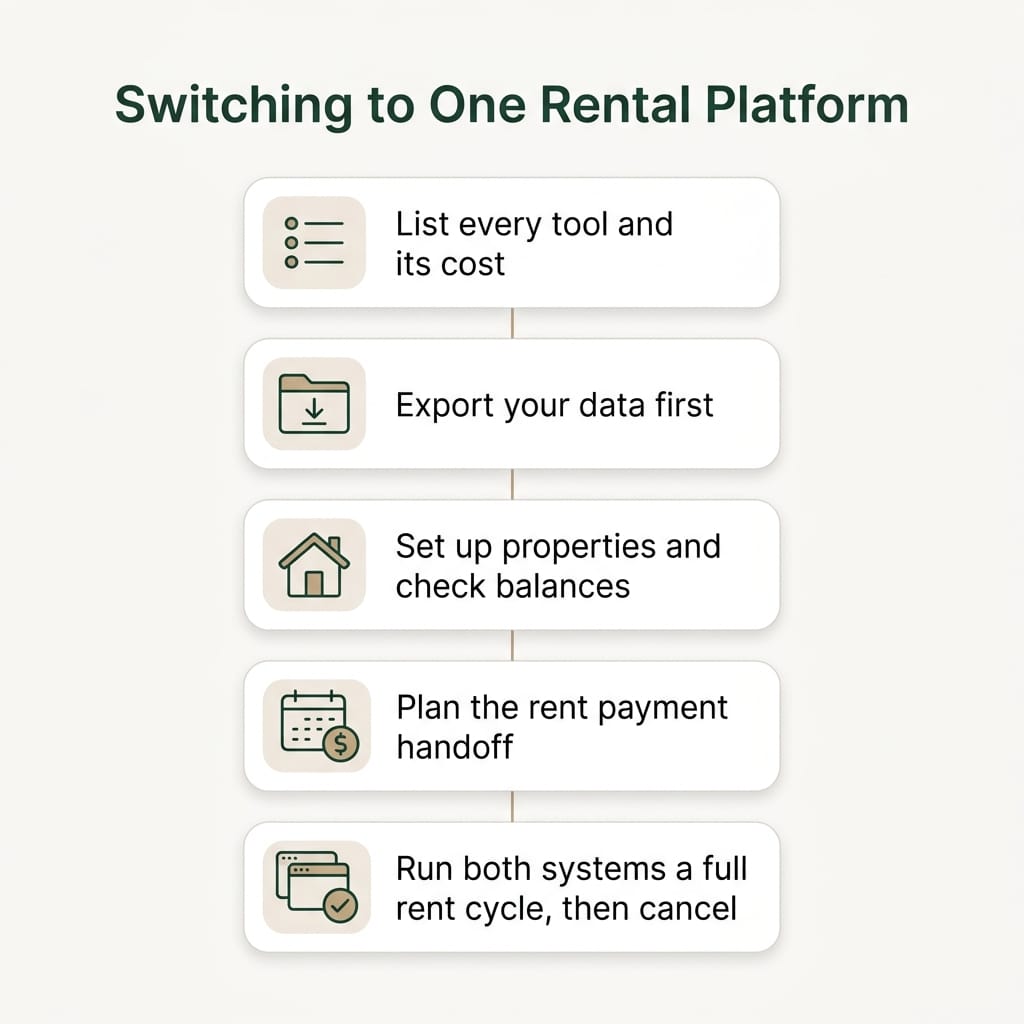
List every tool you use now. Match each one to what replaces it. Move your records first and your rent last. Give tenants time to stop any old autopay. Run the old and new systems side by side through one full rent cycle. Cancel the old subscriptions only after that rent has cleared.
Here is what each old tool turns into on Hemlane, and which plan covers it.
What you use now | What replaces it on Hemlane | Plan |
|---|---|---|
Posting to listing sites one by one | Listing to Apartments.com, Zillow and 7 more top websites | Starter (free) |
A separate screening service | National credit, criminal, eviction and income reporting | Starter (free) |
An accounting spreadsheet | Rental accounting with bank sync, cash flow report and income statement | Starter (free) |
A payment app | Rent collection | Basic |
Folders of leases and PDFs | Lease tracking and document storage | Basic |
Texts and personal email with tenants | Tenant messaging | Basic |
Your own phone at 2 AM | A dedicated repair coordinator and 24/7 emergency support | Essential |
Lease templates pulled off the internet | State-specific lease documents | Essential |
Doing all the admin yourself | A property management assistant, vetted repair network access and VIP support | Complete |
Our plan prices, as listed in November 2026:
- Starter: free.
- Basic: $30/mo (incl. $28 platform fee).
- Essential: $48/mo (incl. $28 platform fee).
- Complete: $86/mo (incl. $28 platform fee).
Each plan builds on the one before. You don't have to start at the top. Start free with listings, screening and the books. Add rent collection and documents when you're ready. Add repair coordination when you're done with night calls.
Your money stays yours. $0 ACH fees. 100% of late fees go directly to you. The number on the lease is the number that lands in your account.
Now the switch itself.
- List every tool and what you pay for it. Write down each subscription and its monthly cost. Add it up. Put that total next to the plan you'd need. That's your real comparison.
- Export your data before you change anything. Pull tenant contacts, leases, rent ledgers, payment history and repair records out of each old tool. Save your own copy in a folder you control. This is your safety net.
- Set up your properties. Add each property, unit and tenant. Enter lease dates, rent amounts and current balances. Upload your signed leases. Check every balance against your old ledger.
- Plan the payment handoff. Switching mid-lease is where rent gets missed. Tell tenants in writing how and when to start paying through the new portal. If a tenant set up an automatic debit from their bank account, only the tenant can stop it. The Consumer Financial Protection Bureau says to give the bank a stop-payment order at least three business days before the payment is scheduled. So send your notice well before that. Give every tenant a clear first due date on the new system.
- Run both systems for one full rent cycle. Keep the old tool open until every tenant's rent has landed through the new one. Watch for two problems: a payment that bounced, and a tenant who paid twice. Fix each one tenant by tenant.
- Cancel the old subscriptions. Only after rent has cleared. Keep your exported files.
Worried about signed leases moving online? Federal e-signature law says a contract or signature can't be denied legal effect just because it's electronic. That doesn't make every lease valid. It means the electronic form, on its own, isn't the problem.
Is it safe to move everything to one place? We support more than 20,000 rental properties in 4,418 cities across the United States. Users give us 4.8-star reviews on Capterra, GetApp and Software Advice. We save clients over $1.15 million per month compared to other solutions. You can read more about who we are.
Software is half the job. Licensed local agents handle what software can't: showings, inspections, key handoffs and local-court coordination. See how the platform and local support fit together.
Ready to stop juggling? Get started with Hemlane.
Should landlords choose cloud-based or desktop rental management software?
For most owners, cloud. Desktop software lives on one computer, and it can suit a single owner with a door or two who takes rent by check. But online rent, tenant portals, bank sync and listing to rental sites all need software connected to the internet. If you want any of those, you want cloud.
Cloud software is software you reach over the internet, whenever you need it. The provider handles most of the upkeep. Desktop software is installed on your own machine. You run it. You maintain it.
Desktop deserves its due. Your data sits on a machine you own. It works with no internet. You aren't depending on a provider. For some owners, that peace of mind matters.
The trade-off: you become the IT department.
Cloud software | Desktop software | |
|---|---|---|
Cost model | Usually a monthly or annual subscription | Often a license, sometimes with paid upgrades |
Updates | The provider pushes them | You install them |
Backups | The provider runs the servers. Keep your own exports too. | All on you |
Who handles security | Shared. The provider secures the system. You control logins and access. | You secure the computer and the files |
Remote access | Any device with a connection | Usually only the machine it's on |
Multiple users | Separate logins for partners, staff and vendors | Hard to share without passing files around |
Tenant-facing features | Online rent, tenant portals, listings, messaging | Generally none |
Tenant features need a connection on both ends. AppFolio's portal terms, for example, list a computer or mobile device with internet or mobile connectivity as a requirement for its portal notices. That's normal for any tenant portal.
Choose this if:
- You live far from your rentals: choose cloud. On Hemlane you get local support while you monitor your property management from anywhere, in all 50 states.
- You have a partner, bookkeeper or staff: choose cloud. Each person gets their own login, not a shared file.
- You want tenants paying online: choose cloud. On Hemlane, leasing, screening, listings, rent collection and maintenance coordination sit in one account with one login, and the books stay current through bank sync.
- You own one or two doors, take checks and keep the books on one computer: desktop can still work. Back it up often. Keep a copy off that machine.
What rental documents should landlords store digitally?
Keep anything that proves what you agreed, what you collected, what you spent and what shape the home was in. Leases, ledgers, receipts, inspection photos and property records all belong in a digital file. One document is the exception. Screening reports should be securely disposed of once you're done using them.
Paperless is good. Paperless and lost is not. Here is a checklist by tenancy stage.
Stage | Document | Why keep it | How long |
|---|---|---|---|
Application and screening | Rental application | Shows who applied and what they told you | Check your state's rules |
Application and screening | Screening report | Backed your approval or denial | Securely dispose of it when you're done using it |
Signing | Signed lease and addenda | The terms you'll point to in any dispute | Check your state's rules |
Signing | Signed lead disclosure, where the federal rule applies | Proves you gave the required disclosure | Three years after the lease begins |
Move-in | Move-in checklist and dated photos | Your baseline for any deposit deduction | Check your state's rules |
Move-in | Security deposit record | Shows what you hold and where | Check your state's rules |
During the tenancy | Rent ledger and payment records | Supports the rental income on your return | Generally until that return's limitations period runs out |
During the tenancy | Repair invoices and receipts | Supports your deductions | Generally until that return's limitations period runs out |
During the tenancy | Notices and tenant messages | Shows what was said and when | Check your state's rules |
Move-out | Move-out checklist, photos and deposit itemization | Explains every deduction | Check your state's rules |
Tax time | Purchase and improvement records | Needed when you sell | Until the limitations period ends for the year you dispose of the property |
Tax time | Annual statements and Schedule E figures | Ties your return to your books | Generally until that return's limitations period runs out |
On tax records, the Internal Revenue Service says the general rule is to keep records that support income, deductions or credits until the limitations period for that return runs out. Its baseline is 3 years, but only when certain exceptions don't apply. Property records run longer. Keep them until that period ends for the year you sell.
On screening, the Federal Trade Commission says that when you're done using a consumer report, you must securely dispose of the report and any information you gathered from it. A screening report isn't something you keep forever. Delete the download. Shred the printout.
On electronic leases, the file has to stay usable. Under federal e-signature law, an electronic lease can be denied legal effect if it can't be kept and accurately reproduced later by everyone entitled to a copy. Store a version you can open, print and share. A file you can't get back out of an app is a risk.
A simple system works best. Make one folder per property. Inside it, make one folder per tenancy. Name every file the same way: date, address, document type. Anyone can find anything in seconds.
On Hemlane, the Basic plan includes lease tracking and document storage, so each lease and its dates sit next to the tenant. Essential adds state-specific lease documents. At tax time, we generate tax-ready Schedule E reports, rent rolls and tenant ledgers from the property ledger. See how the reports work.
This checklist informs. It isn't legal or tax advice. Check your state's rules and talk to your tax professional.
Manage your rentals on Hemlane.


How should property managers set user permissions in online rental management software?
Give every person their own login and only the access their job needs. Keep bank settings and the release of funds with the owner. Turn on multi-factor authentication first for admins and anyone who handles money or screening data. Remove access the same day someone leaves or changes roles.
Your owners trust you with two things: their money and their tenants' data. One shared password puts both at risk. A clean access list is something you can show every owner you serve.
The idea is called least privilege. Each user gets the minimum access needed to do their assigned task. Personal data, like a screening report, goes only to people with a need to know.
Role | View financials | Change bank or payment settings | View screening data | Approve repairs or release funds | Message tenants |
|---|---|---|---|---|---|
Owner | Yes | Yes | Yes | Yes | Yes |
Co-owner or partner | Yes | Only if all owners agree | Yes | As your ownership agreement says | Yes |
Leasing agent | No | No | Only their own applicants | No | Applicants and new tenants |
Maintenance coordinator | Repair costs only | No | No | Recommends; owner approves | About repairs only |
Bookkeeper | Yes | No | No | No | No |
Vendor | No | No | No | No | About their own job only |
Tenant | Their own ledger only | Their own payment method only | No | No | Yes |
If you manage for others, agree with each owner in writing what you may approve on their behalf. Then set access to match.
The same rule applies to help you bring in. On Hemlane, the Essential plan includes a dedicated repair coordinator. Complete adds a property management assistant. They take the work. The owner keeps the decisions. Hemlane is not a property management firm and makes no decisions on an owner's behalf. Owners keep full visibility into their financials and their properties.
Before you invite anyone in, ask any provider what user roles and controls it offers.
Passwords are not enough. The Cybersecurity and Infrastructure Security Agency says strong passwords help but no longer keep accounts safe on their own. It advises starting multi-factor authentication with admin accounts and people who handle sensitive data. In a rental business, that means anyone who can touch bank settings, rent or screening reports.
Set up in this order. Create the owner and admin logins first, with multi-factor authentication on. Then add each person with the role from the matrix, and nothing more. Review the list on a set schedule.
Offboarding needs a routine too. Have a set procedure so anyone who leaves, or moves to another role, loses access to sensitive information. When a bookkeeper leaves or a vendor's job ends, remove the login that day. Change any lockbox or door codes they knew. Write down who had access and when it ended. That record is what an owner will ask for.
How do property managers handle trust accounts with online rental management software?
A trust account holds money that belongs to someone else: owners' rent and tenants' deposits. If you manage for others, your state likely sets rules for that account, including regular reconciliation. Keep those funds apart from your own. Match the bank to your ledger every month. Confirm the details with your own state's regulator.
Managing only your own rentals? Whether any of this reaches you depends on your state and your role. Check before you assume.
There is no single national rule. Two states show what regulators look for.
In California, the California Department of Real Estate lists common violations: commingling trust funds with business or personal funds, failing to reconcile trust accounts regularly, and not keeping proper records for each transaction. It advises keeping columnar records for each beneficiary and reconciling monthly. In plain words: one running record per owner and per tenant, and a monthly check that it all adds up.
In Florida, a brokerage with an escrow account must complete a monthly reconciliation statement. An accountant can prepare it. The broker must still review, sign and date it. Florida also lets a broker keep up to $5,000 of personal or broker funds in a property management escrow account. That's how specific state rules get. Don't assume your state matches.
Handling an owner's money? Keep it separate. Reconcile it every month.
- Pull the month-end bank statement for each trust account.
- Match it to the balance in your software ledger.
- Match the ledger total to the sum of every owner's and every tenant's balance.
- Find and fix each difference before you close the month.
- Confirm owner funds, operating money and security deposits sit where your state requires.
- Check that any of your own money in the account stays within your state's limit, if it has one.
- Sign and date the reconciliation, and keep the record.
- Confirm your state's current rules with its regulator.
Software makes the matching faster. On Hemlane, rental accounting includes bank sync. We generate owner statements and tenant ledgers from the property ledger, formatted for sharing with owners. That gives you one source for every balance you reconcile. The review and the signature stay with you.
For real estate agents, our REALTOR partnerships let you offer full property management without the trust account administration.
This section informs. It isn't legal advice.
Frequently Asked Questions
Can online rental management software send owner statements automatically?
Some platforms can. Buildium, for example, lets users schedule owner statements to generate and deliver on a fixed date each month. It suggests a send day a few days after month-end close, so every transaction is captured. That timing makes sense in any system. On Hemlane, owner statements, cash flow statements, income statements, rent rolls and tenant ledgers come straight from the property ledger. They're formatted for direct sharing with owners. No manual exports. No spreadsheets.
Does online rental management software work offline?
Mostly, no. Rent, portals and messages need a connection. AppFolio's portal terms list a device with internet or mobile connectivity as a requirement. A few apps cover a dead signal for certain tasks. RentCheck's app lets users run inspections offline and stores them on the device until they can be submitted. Even there, flagging items for maintenance doesn't work offline. If a property has bad signal, take photos and notes on your phone. Upload them when you're back in range.
What happens to rental data if an online rental management software company shuts down?
It depends on the provider's terms, so read them before you move. Shutdowns do happen. Landlord Studio reported that Cozy, a rental platform, was shut down and accounts had to move to Apartments.com. Some terms give you a short window. PropertyCtrl's terms let customers request a data export within 30 days of termination. Federal regulators have said consumers should be able to trust companies to keep their promises about sensitive data, even through a bankruptcy. Don't lean on that alone. Export your ledgers, leases and tenant records on a regular schedule. Keep copies you can open and reproduce, since an electronic lease has to stay retrievable. That's good practice with any provider, us included.
Five logins become one. Rent lands in your account with $0 ACH fees. On Essential, the 2 AM repair call goes to our team, not you. You still make every decision. Get started with Hemlane.
Hemlane, Inc. is a technology company that helps you manage your long-term rental properties. Communications between you and Hemlane are protected by our Privacy Policy. Hemlane also provides access to independent licensed professionals and self-help services at your specific direction. We are not a property management firm. We cannot make any decisions on behalf of any property owners. Any content found in the Hemlane Academy is not a substitute for advice and ideas from a qualified legal source or expert. You are responsible for performing additional research to confirm you are complying with all laws applicable to your rental situation.
Sources


- Consumer Financial Protection Bureau — You have protections when it comes to automatic debit payments from your account | Consumer Financial Protection Bureau · retrieved November 3, 2026
- Internal Revenue Service — How long should I keep records? | Internal Revenue Service · retrieved November 3, 2026
- Federal Trade Commission — Using Consumer Reports: What Landlords Need to Know | Federal Trade Commission · retrieved October 26, 2026
- Cybersecurity and Infrastructure Security Agency (CISA) — Require Multifactor Authentication | CISA · retrieved November 3, 2026
- California Department of Real Estate — Licensee Advisory · retrieved November 3, 2026
- Legal Information Institute, Cornell Law School (15 U.S.C. 7001) — 15 U.S. Code § 7001 - General rule of validity | U.S. Code | US Law | LII / Legal Information Institute · retrieved November 3, 2026
- Florida Realtors — Escrow | Florida Realtors · retrieved November 3, 2026
- NIST Computer Security Resource Center — least privilege - Glossary | CSRC · retrieved November 3, 2026
- Federal Trade Commission — Protecting Personal Information: A Guide for Business | Federal Trade Commission · retrieved November 3, 2026
- NIST Computer Security Resource Center (SP 800-145) — SP 800-145, The NIST Definition of Cloud Computing | CSRC · retrieved November 3, 2026
- U.S. Environmental Protection Agency — Real Estate Disclosures about Potential Lead Hazards | US EPA · retrieved November 3, 2026
- Buildium — How to Set Up Automated Monthly Reports for Owners | Buildium · retrieved November 3, 2026
- RentCheck Help Center — Offline Capabilities for Inspections | RentCheck Help Center · retrieved November 3, 2026
- AppFolio — FolioSpace Terms of Service · retrieved November 3, 2026
- Landlord Studio — Landlord Studio vs Apartments.com Rental Manager - #1 Alternative to Apartments.com Rental Manager · retrieved November 3, 2026
- PropertyCtrl — Terms of Service - PropertyCtrl | PropertyCtrl · retrieved November 3, 2026
- Federal Trade Commission — Federal Trade Commission Chairman Andrew N. Ferguson Issues Letter on 23andMe Bankruptcy Impact to Consumers | Federal Trade Commission · retrieved November 3, 2026
Get the Latest in Real Estate & Property Management!
I consent to receiving news, emails, and related marketing communications. I have read and agree with the privacy policy.


