
Online Property Management Software: Accounting Guide 2026

Editorial Staff
Content published by Hemlane is created and reviewed by members of our editorial team, including experienced technical writers and real estate professionals.
Rent lands in one app. Receipts sit in a drawer. The books live in a spreadsheet nobody trusts. Then spring comes, and a weekend disappears into fixing it.
That isn't a you problem. It's a patchwork problem. Five tools that don't talk to each other will always leave gaps.
This guide covers five things. The accounting features your rentals need. Whether QuickBooks is enough. A routine that keeps the books clean. A tax-season checklist built on 2026 IRS rules. And how to pick software for your own doors. Where a tax professional takes over, we say so.
What accounting features do landlords and property managers actually need?
Every owner needs four things. Tracking by property. Bank sync. Receipt storage. Reports that line up with Schedule E. Once you own several doors or have partners, add reports by owner or entity, plus tenant ledgers. Trust accounting only matters if you hold other people's money as a third-party manager.
Start with the tax form. Schedule E uses a separate column for each rental property. So your software has to keep every dollar tied to a door. If it can't, you'll split it out by hand every spring.
Receipts matter just as much. You generally need proof for your expenses: receipts, canceled checks or bills. A photo in a folder beats a faded slip in a glovebox. Storage isn't an extra. It's your backup if questions come.
Trust accounting is the one most owners can skip. In plain words, it means holding owners' and tenants' money in a separate account and proving whose dollars are whose. Vendors sell it to managers, not owners. Rentec Direct, for example, puts trust account management and reporting in its property-manager tier, Rentec PM. The rules behind it come from each state, not one national rule.
Who needs it | Feature | What it solves |
|---|---|---|
Every owner | Income and expenses tracked per property | Schedule E wants each rental in its own column |
Every owner | Bank and card sync | No retyping lines from statements |
Every owner | Receipt and document storage | Proof for every expense you claim |
Every owner | Rent collection tied to the lease | You see who paid and who's late, without a spreadsheet |
Every owner | Cash flow report and income statement | You see whether each door makes money |
Growing portfolio or partners | Reports by owner, entity or whole portfolio | Each LLC or partner gets its own numbers |
Growing portfolio or partners | Rent roll and tenant ledgers | One view of every lease, balance and due date |
Growing portfolio or partners | Tax-ready Schedule E report | Year-end totals per property, ready for your tax pro |
Third-party managers holding owner funds | Trust account management and reconciliation | Keeping owner and tenant money apart under your state's rules |
Third-party managers holding owner funds | Owner disbursements | Paying each owner their share on time |
Here's how we handle the owner rows. Our plans include full rental accounting: bank sync, cash flow report, income statement and more. We sync your bank and card accounts and record transactions automatically. We integrate with QuickBooks too.
Every report comes straight from the property ledger. Cash flow statements. Income statements. Owner statements. Rent rolls. Tenant ledgers. Tax-ready Schedule E reports. Run them for one property, one owner, one entity or the whole portfolio. No exports. No spreadsheets. See every report we build from the ledger.
And the money stays yours. $0 ACH fees. 100% of late fees go directly to you. The number on the lease is the number that lands in your account.
Does QuickBooks Work for Property Management Accounting?
Yes, if you set it up for rentals by hand and don't mind entering rent yourself. QuickBooks is a solid general ledger. It just doesn't know what a lease is. It can't tell rent from a deposit, or a late tenant from a paid one, unless you build that in. For a few doors, that can be enough.
The deposit trap is the classic slip. The IRS says in its guide to residential rental property not to count a security deposit as income when you get it, if you plan to return it. Count only the part you keep, in the year you keep it. A general ledger won't know that. If the deposit lands in the same bucket as rent, your income looks bigger than it is.
If you stick with a general ledger, set it up like this:
- Give each property its own tag or class, so every line ties to a door.
- Create a separate account for deposits you hold, apart from rent income.
- Make separate categories for repairs and for improvements.
- Connect only your rental bank account, not your personal one.
- Reconcile every month against the bank statement.
What you need | General ledger alone, like QuickBooks | Rental platform |
|---|---|---|
Rent collection tied to the lease | You record each payment yourself | Rent is collected against the lease and recorded |
Tenant ledgers | Built by hand, if at all | Generated for each tenant |
Per-property tracking | Works once you set up tags | Built around each property from day one |
Deposits held | You create and maintain the account | Set up around the lease and tenant |
Schedule E output | You map categories at year end | Schedule E report from the ledger |
Setup effort | Hours up front, then steady upkeep | Add properties and connect accounts |
QuickBooks alone works if:
- You own a few doors and don't mind manual rent entry.
- Your accountant already lives in QuickBooks and set it up for rentals.
- Someone else handles leasing, screening and repairs.
It falls short when:
- You collect rent online and want it to post to the right tenant on its own.
- You need tenant ledgers and a rent roll without building them.
- Repairs, rent and receipts live in other apps you have to stitch together.
You don't have to choose. Hemlane integrates with QuickBooks. Run the rentals on Hemlane, where rent, repairs, rent rolls and tenant ledgers live. Keep QuickBooks in the loop for your accountant.
What are the best practices for tracking rental income and expenses?
Keep rental money in its own account. Record each transaction when it happens. Save every receipt. Hold deposits apart from income. Tag repairs and improvements separately. Reconcile every month. Keep records at least three years, and property records longer. Software can carry most of this load. The tagging still needs your judgment.
- Open a separate bank account for your rentals. Why: the IRS advises small businesses in its guide to starting a business and keeping records to keep a business account apart from personal checking. How software helps: sync that one account, and every rental dollar arrives in one place.
- Record transactions as they happen. Why: the IRS says to record expenses when they occur, and daily is generally best. How software helps: we sync your bank and card accounts and record transactions automatically.
- Keep a receipt for every expense. Why: you generally need receipts, canceled checks or bills to back up what you claim. How software helps: document storage comes with our Basic plan, next to lease tracking, rent collection and tenant messaging.
- Hold refundable deposits apart from rent. Why: a deposit you plan to return isn't income when you get it. How software helps: record it as money held, not as rent, so your income stays honest.
- Tag repairs and improvements when you enter them. Why: the IRS tells owners to keep these costs apart. You'll need improvement costs when you depreciate or sell. How software helps: pick the category the day the bill comes in, not in April. That call is still yours.
- Reconcile every month. Reconciling means matching your records against the bank statement, line by line. Why: the IRS says to check your account for errors this way. How software helps: sync gives you the data. You confirm it matches.
- Keep records long enough. Why: the general IRS rule is three years from the date you filed the return. Records about the property itself stay longer. Keep them until the time limit runs out for the year you sell it. How software helps: everything sits in one place, not in five apps. Your tax pro can tell you if a longer period applies to you.
How do landlords prepare for tax season with rental accounting software?
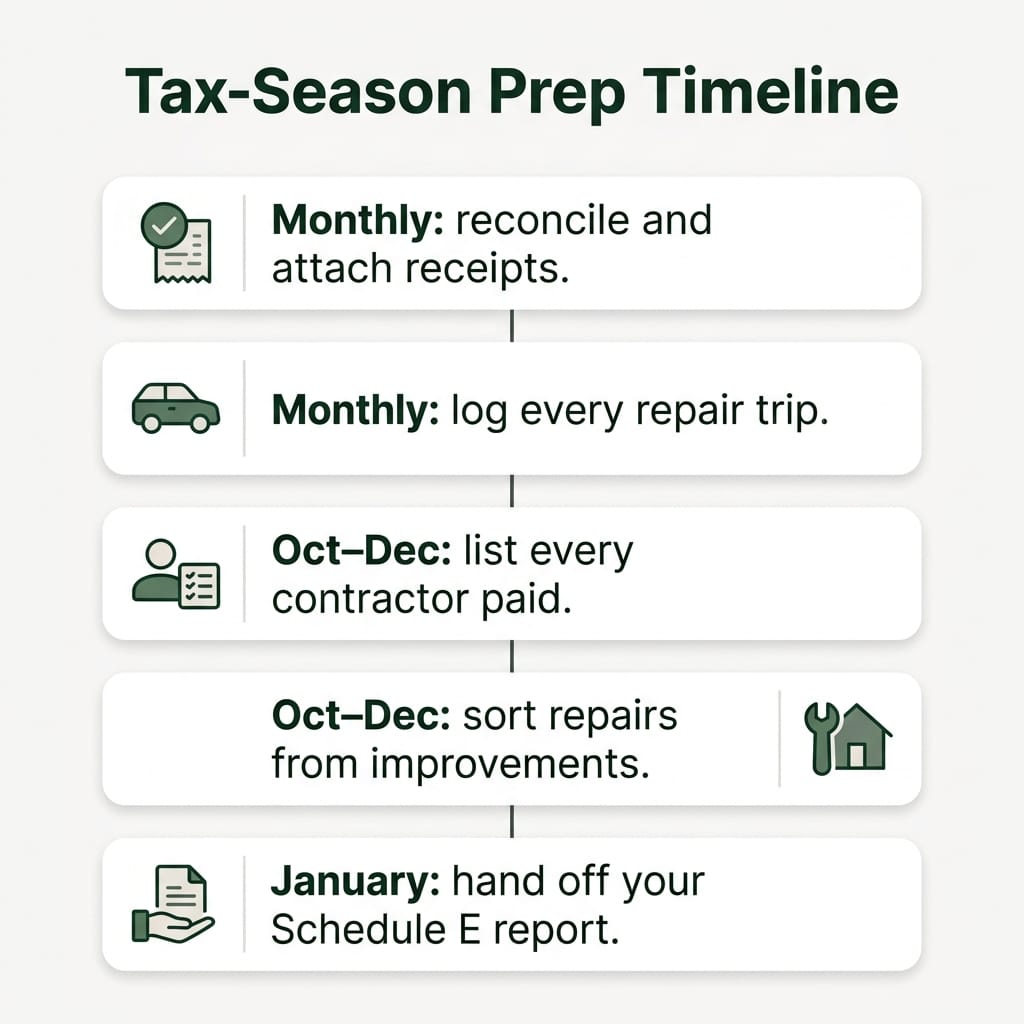
Start now, not in April. Each month, reconcile and attach receipts. In the fourth quarter, collect contractor details and sort repairs from improvements. In January, file Form 1099-NEC by January 31 and hand your tax pro a Schedule E report with one column per property. Depreciation and safe-harbor choices belong to your tax pro.
It's November. That leaves time to do this calmly.
Every month
- Reconcile and attach receipts. Match the month to your bank statement. Fix any line without a receipt or a property. Report to check: cash flow statement and income statement.
- Log every trip for repairs. The IRS tells owners to track travel for rental repairs. The IRS set the 2026 business standard mileage rate at 72.5 cents per mile. Write down the date, miles, property and reason for each trip.


Fourth quarter: October to December
- List every contractor you paid this year. You file Form 1099-NEC for each person you paid at least $2,000 in the course of your business. That threshold used to be $600. The One Big Beautiful Bill Act raised it to $2,000 for payments made after December 31, 2025. Paid a plumber $2,000 or more this year? Get their details now. Report to check: expenses by vendor and property.
- Sort repairs from improvements. A repair keeps the place working. An improvement makes it better or longer-lasting. Improvements are generally depreciated. For residential rentals, that means spreading the cost evenly over 27.5 years. Report to check: income statement by property.
- Flag items for the safe-harbor talk. Two IRS safe harbors can change how a cost is treated. They don't apply on their own. The de minimis safe harbor lets many owners deduct smaller purchases right away. The IRS calls audited financial statements an applicable financial statement. Without one, the limit is $2,500 per invoice or item, backed by the invoice. Most small owners don't have one. The routine maintenance safe harbor may let you deduct some costs even when they count as improvements. Both are choices to make with a tax pro. Bring them the invoices, sorted.
January
- File your 1099-NEC forms. The IRS Form 1099-NEC instructions set the deadline at on or before January 31, on paper or electronically. For repairs coordinated in Hemlane, we file the 1099s. Contractors you hired outside Hemlane are yours to file.
- Answer the Schedule E 1099 question. Schedule E asks whether you made payments that would require any Forms 1099. Your contractor list from step 3 answers it.
- Hand off your Schedule E report. Schedule E lists total income, expenses and depreciation for each rental. Each property gets its own column. We prepare a tax-ready Schedule E report from the property ledger, along with cash flow and income statements. Your tax pro reviews it, handles depreciation and makes the elections. Nothing here is tax advice. It's the prep that makes their job shorter.
Want books that build themselves from real rent and real repairs before next January? Manage your rentals on Hemlane.
What Is the Best Accounting Software for Landlords?
It depends on who you are. For bookkeeping only, a free investor tracker may be enough. If you self-manage and want books tied to leasing, rent and repairs, pick one platform that does all of it. If you hold other owners' money, you need trust accounting. Large multifamily teams need enterprise tools.
Vendors split plans by size and role. Rentec Direct, for one, sells a Starter plan for 10 or fewer properties and puts trust account management in its manager tier. Match the tool to your situation, not to a ranking.
Your situation | Type of tool that fits | Why |
|---|---|---|
Bookkeeping only, someone else runs leasing | Free investor tracker, such as Stessa's free Essentials plan | You only need income, expenses and reports |
Self-managing owner who wants books tied to leasing and rent | All-in-one owner platform, like Hemlane | Books build from real rent, repairs and leases |
Growing portfolio across several states | Owner platform with local, in-person backup | Reports by entity, plus help where you can't be |
Third-party manager holding owner funds | Manager-tier software with trust accounting, such as Rentec PM | Trust rules are set state by state |
Large multifamily community | Enterprise suite | Built for high-volume leasing; AppFolio's Core plan states a 50-unit minimum and a minimum monthly spend, as Showdigs reported in 2026 |
Here's what we charge, as listed on our pricing page in November 2026:
- Starter: free. Tenant screening, rental accounting, and listings to Apartments.com, Zillow and 7 more top websites.
- Basic: $30/mo (incl. $28 platform fee). Adds lease tracking, document storage, rent collection and tenant messaging.
- Essential: $48/mo (incl. $28 platform fee). Adds a dedicated repair coordinator, 24/7 emergency support and state-specific lease documents.
- Complete: $86/mo (incl. $28 platform fee). Adds a property management assistant, vetted repair network access and VIP support.
Paid plans start with a 14-day trial. Annual billing brings a discount. No guessing on rent either: $0 ACH fees, and 100% of late fees go to you.
Software can't hand over keys. Licensed local agents handle showings, inspections, key handoffs and local-court coordination, with local support in all 50 states. See how local agents back the software.
Owners rate us 4.8 stars on Capterra, GetApp and Software Advice. We support over 20,000 rental properties in 4,418 cities across the United States. Check our scale and reviews.
Choose Hemlane if:
- You run your own doors and want accounting tied to listing, rent and repairs in one login.
- You want every dollar on the lease to land in your account, with $0 ACH fees.
- You want a Schedule E report your tax pro can use, without a spreadsheet.
- You own in more than one state and need in-person help where you aren't.
- You want QuickBooks to stay in the picture for your accountant.
Look elsewhere if:
- You only want a ledger and a free investor tracker already does the job.
- You manage for other owners and hold their funds, so you need trust accounting.
- You run a large multifamily community and need self-touring and smart access tools.
You call the shots. We handle the rest. Get started with Hemlane.
Frequently Asked Questions
What financial reports should a landlord review every month?
Start with reconciliation. The IRS advises checking your account for errors by reconciling it, and a monthly check keeps small mistakes small. Then a practical routine. The rent roll and tenant ledgers catch unpaid rent early. The cash flow statement shows what came in and went out. The income statement spots odd expenses per property. We generate all four from the property ledger. Ten minutes a month beats a lost weekend in spring.
What is bank sync in rental accounting software?
Bank sync connects your bank and card accounts to the software, so transactions flow in without retyping. We sync bank and card accounts and record transactions automatically. Worried about safety? Many apps connect through a provider such as Plaid, which says it doesn't share your bank username and password with the apps you use. Ask any vendor how it connects before you link an account. Sync is not reconciliation, though. Xero, the accounting software company, defines reconciliation as matching the transactions in your records with the ones on your bank statement. Sync brings the data in. Reconciling proves it's right.
What Is the Best Accounting Software for Property Management Companies?
It depends on whether you hold other owners' money. If you do, you need trust accounting. Some states spell out exactly what that means. Arizona is one example. Its law, published by the Arizona State Legislature, requires brokers to do a monthly three-way reconciliation. That means checking three records against each other: trust bank statements, client ledgers and trust account ledgers. Other states set their own rules, so check yours. Vendors package this in manager tiers. Rentec Direct includes trust account management and reporting in Rentec PM. Count minimums in the true cost too: AppFolio's Core plan states a 50-unit minimum and a minimum monthly spend, as reported by Showdigs. Our reports include owner statements formatted for sharing with owners. If trust accounting is a must for your business, choose a tool built for it.
Clean books aren't about working harder. They're about one place where rent, receipts and repairs meet. Get started with Hemlane.
Hemlane, Inc. is a technology company that helps you manage your long-term rental properties. Communications between you and Hemlane are protected by our Privacy Policy. Hemlane also provides access to independent licensed professionals and self-help services at your specific direction. We are not a property management firm. We cannot make any decisions on behalf of any property owners. Any content found in the Hemlane Academy is not a substitute for advice and ideas from a qualified legal source or expert. You are responsible for performing additional research to confirm you are complying with all laws applicable to your rental situation.
Sources


- Internal Revenue Service — Publication 527 (2025), Residential Rental Property | Internal Revenue Service · retrieved November 3, 2026
- Internal Revenue Service — Publication 583 (12/2024), Starting a Business and Keeping Records | Internal Revenue Service · retrieved November 3, 2026
- Internal Revenue Service — IRS sets 2026 business standard mileage rate at 72.5 cents per mile, up 2.5 cents | Internal Revenue Service · retrieved November 3, 2026
- Internal Revenue Service — Instructions for Forms 1099-MISC and 1099-NEC (12/2026) | Internal Revenue Service · retrieved November 3, 2026
- Arizona State Legislature — 32-2151 - Disposition of monies; trust fund accounts; deposit requirements; broker duties; violations · retrieved November 3, 2026
- Pease Bell CPAs — 1099 Threshold 2026: New OBBBA Reporting Rules Explained · retrieved November 3, 2026
- Internal Revenue Service — 2025 Instructions for Schedule E (Form 1040) (2025) | Internal Revenue Service · retrieved November 3, 2026
- Internal Revenue Service — Tangible property final regulations | Internal Revenue Service · retrieved November 3, 2026
- Internal Revenue Service — Tips on rental real estate income, deductions and recordkeeping | Internal Revenue Service · retrieved November 3, 2026
- Rentec Direct — Rentec Direct Property Management Software Pricing | Rentec Direct · retrieved October 26, 2026
- Internal Revenue Service — Good recordkeeping year-round helps taxpayers avoid tax time frustration | Internal Revenue Service · retrieved November 3, 2026
- Stessa — Choose the Right Stessa Plan For You | Stessa Help Center · retrieved November 3, 2026
- Showdigs — AppFolio Pricing 2026: What It Really Costs | Showdigs · retrieved November 3, 2026
- Plaid — Plaid helps you link your financial institutions | Plaid · retrieved November 3, 2026
- Xero — What is bank reconciliation? | Xero US · retrieved November 3, 2026
Get the Latest in Real Estate & Property Management!
I consent to receiving news, emails, and related marketing communications. I have read and agree with the privacy policy.


