
Landlord Software Setup Guide: Records, Rent and Security

Editorial Staff
Content published by Hemlane is created and reviewed by members of our editorial team, including experienced technical writers and real estate professionals.
Five tools. Five logins. Five places where data goes missing. You signed up for software to end that. Now it has to earn its keep.
Most guides stop at picking a tool. This one starts after you pick. It covers what to set up first and how to get tenants using the portal. It covers records that hold up, switching without losing a ledger, and the security habits that stay yours.
We support more than 20,000 rental properties in 4,418 cities across the United States. We've completed 61,218 service requests. This is the order we'd use.
How can landlords get the most out of landlord software after signing up?
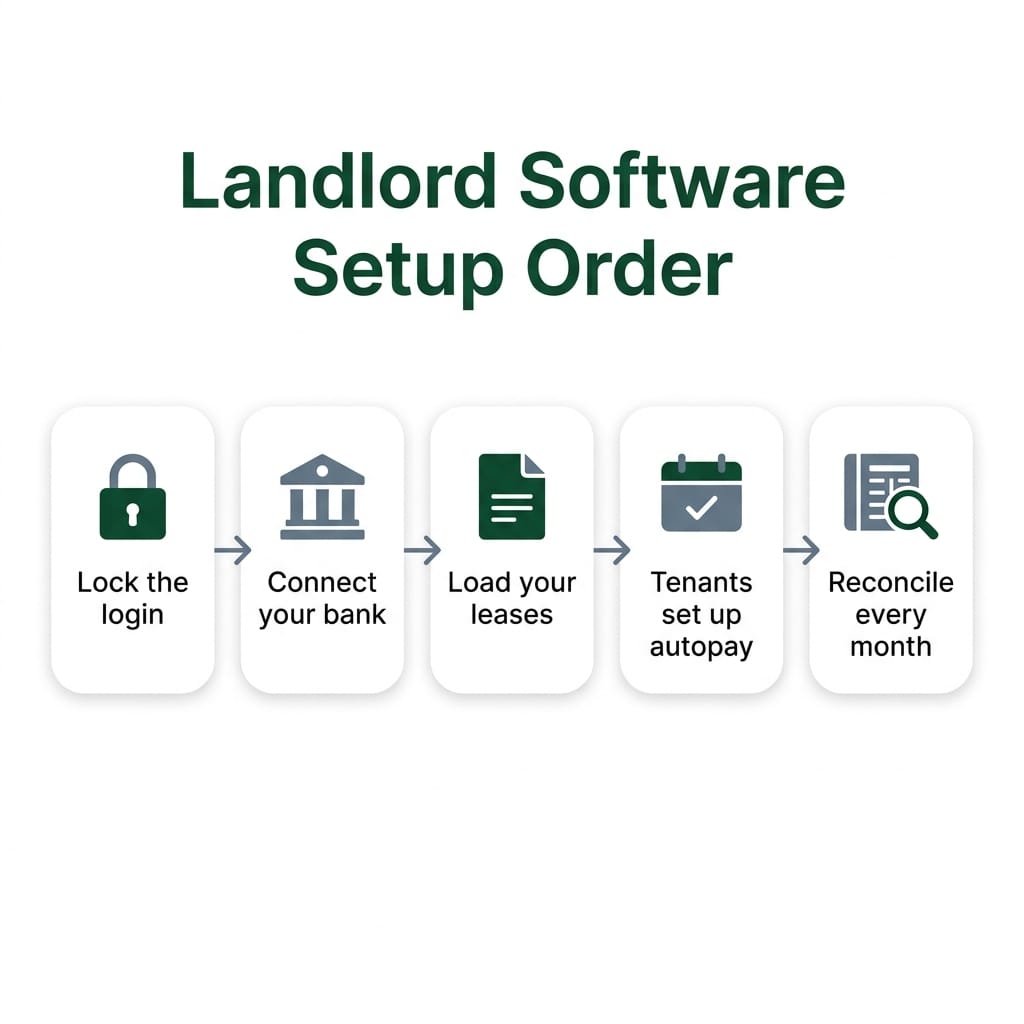
Set it up in order. Lock the login first. Connect your bank. Load your leases. Then ask every tenant to sign up for autopay themselves. Turn on the reminders and late fee rules you choose. After that, build one monthly habit: check the ledger against the bank. In that order, the software saves time from the first rent cycle.
The tool is rarely the problem. The setup order is. Here it is, phase by phase.
First day
- Lock the login. Use a password you use nowhere else. Turn on multifactor authentication for the email tied to your account and for your bank. The Cybersecurity and Infrastructure Security Agency (CISA) is clear on this. A strong password helps. Alone, it's no longer enough. This step is yours.
- Connect your bank. Rental accounting on our free Starter plan includes bank sync, a cash flow report and an income statement. Connect the account where rent should land. Then every number has a home.
First week
- Load your leases. Enter each unit, tenant, rent amount, due date and lease end date. Upload the signed lease. Our Basic plan adds lease tracking and document storage. Renewal reminders go out ahead of each lease end. If you use QuickBooks, connect it now.
- Ask every tenant to set up autopay. You can't do it for them. Under federal rules, only the tenant can approve recurring payments from their bank account. They have to sign it or confirm it in a similar secure way. The tenant also gets a copy. So send the invite on day one. Follow up until every tenant is enrolled.
- Set your reminders and late fee rules. Rent collection includes payment reminders, automatic late fees and autopay, with $0 ACH fees. You pick the fee and the grace period, based on your lease and your state's rules. The software applies what you set. 100% of late fees go to you. Set it up with our rent collection tools.
First month
- Decide who takes the 2 AM call. Tenants don't report a burst pipe during business hours. On Basic, requests come in through tenant messaging and you handle them. On Essential, a dedicated repair coordinator and 24/7 emergency support pick up. That's where the task moves from software to people.
- Fill any vacancy. Starter lists your unit on Apartments.com, Zillow and 7 more top websites. Screening covers national credit, criminal, eviction and income reporting.
Every month
- Reconcile. Match each rent payment in the ledger to your bank. Tag every expense. Attach the receipt. The IRS says software is a fine way to keep electronic records, and it urges keeping your important information together. A monthly check keeps tax time short.
Here is which plan hands which task to people. Prices are as listed in November 2026.
Plan | Price | What it adds | Who does the work |
|---|---|---|---|
Starter | Free | Tenant screening, rental accounting, listing to Apartments.com, Zillow and 7 more | You, with the software |
Basic | $30/mo (incl. $28 platform fee) | Lease tracking, document storage, rent collection, tenant messaging | You, with the software |
Essential | $48/mo (incl. $28 platform fee) | Dedicated repair coordinator, 24/7 emergency support, state-specific lease documents | Repair calls move to our team |
Complete | $86/mo (incl. $28 platform fee) | Property management assistant, vetted repair network access, VIP support | More daily work moves to people |
On every plan, you make the calls. See how our property management software takes the load off your week.
Get started with Hemlane
How do landlords switch property management software without losing data?
Export everything before you cancel anything. Then set up the new account and check that the numbers match. Move tenants' autopay in the gap between one rent date and the next. Tenants must authorize the new payments themselves and stop the old ones. Close the old account last, after the first rent lands cleanly.
Your old platform won't keep your ledger forever. A calm switch is a sequence, not a race. Take it one step at a time.
- Pick your cutover date. Choose a day right after rent clears. That gives you nearly a full month before the next due date.
- Export everything. Use the list below. Save files you can open without the old platform, like spreadsheets and PDFs.
- Back up the exports. A trusted backup guideline, the 3-2-1 rule, starts with three copies of anything that matters. Don't keep all three in the same place.
- Set up the new account. Connect your bank. Add units, tenants and leases. Enter each tenant's current balance and deposit held. With us, you can create state-specific leases and collect e-signatures without DocuSign if anything needs re-signing.
- Verify before tenants see it. Check every balance and deposit against your export. Fix any gap now.
- Tell tenants in writing. Give the switch date, the new portal and what you need from them.
- Move autopay with care. Tenants must authorize recurring payments on the new system themselves. Cancelling your old account does not stop their old autopay by itself. Under rules published by the Consumer Financial Protection Bureau, a tenant can stop a scheduled debit by telling their bank at least three business days before it runs. Turn off the old schedule on your side too, if the old platform lets you.
- Watch the first rent cycle. Confirm one payment per tenant, on the new system only. If someone paid twice, refund it right away.
- Close the old account last. Keep your exports. Keep records that back up your income or deductions. The IRS says to hold them until the window to change or review that return closes. A cancelled account doesn't change that.
The data easiest to lose in a switch:
- Full payment history for each tenant, including partial payments and late fees
- Security deposit amounts, dates received and where each is held
- Signed leases, addenda and renewals
- Move-in condition photos and inspection notes
- Tenant messages and maintenance history
- Copies of notices you sent
- Vendor invoices and receipts
- Year-end reports and statements
Our paid plans start after a 14-day trial. Use that window to set up and check your numbers before you move tenants. Once you're in, leases, documents and tenant records live in one place, with bank sync and QuickBooks integration.
What can tenants do in a landlord software tenant portal?
In a good portal, tenants apply, sign, pay rent, ask for repairs, message you and renew, all in one place. Every action leaves a dated record on your side. On Hemlane, tenants manage their lease, payments and communications from one login. They pay by ACH, card or Cash App. ACH carries $0 fees.
The goal is simple. Rent, requests and messages stop coming through texts and calls. Buildium, another software company, describes a portal as round-the-clock access where tenants pay rent, send a maintenance request or check their lease without calling you. It also points to tenants seeing live updates on their requests. Fewer calls is the win.
Here is the tenancy in order.
Stage | What the tenant does | What you see or gain |
|---|---|---|
Apply | Applies online. Many renters pay an application fee at this step. | Screening results: national credit, criminal, eviction and income reporting |
Sign | Signs the lease by e-signature, no DocuSign needed | A signed copy stored with the tenant's records |
Pay | Pays by ACH, card or Cash App. Sets up autopay with their own authorization. | Rent deposited to your bank in 2 to 3 business days. 100% of late fees go to you. |
Request repairs | Sends the request through the portal | A dated request in writing. On Essential, a repair coordinator and 24/7 emergency support take the call. |
Message | Writes to you in the portal | One dated thread, not scattered personal texts |
Renew | Reviews and signs the renewal | Renewal reminders ahead of the lease end |
Move out | Gives notice and a forwarding address in writing | A dated notice and the address on file for the deposit |
A few points to set expectations. Fees on the first step are common: a federal consumer agency reports that 68% of renters pay application fees. Only ACH is $0. Card and Cash App are there for choice. And autopay always starts with the tenant. You send the invite. They authorize it.
There's also a reason for tenants to pay on time. Tenant Perks lets them earn rewards for on-time payments and build credit. Credit bureaus accept rent data straight from an owner or through a rent reporting service that works with them.
Manage your rentals on Hemlane
How can landlords use landlord software to keep records that hold up in a tenant dispute?
Build the record as things happen, not after a fight starts. Keep dated move-in and move-out photos, every repair request and reply, every payment and late fee, and every notice, all in one place. Deadlines differ by state, so set reminders around yours. Good records help you show what happened. They don't guarantee an outcome.
The fear is fair. It can turn into your word against the tenant's. The answer is process, kept up every week.
Start with deposits. Legal aid groups tell tenants that an owner can't keep a deposit for damage that was there at move-in. They also tell tenants to take pictures when they move out. So expect the tenant to have photos. Have your own, dated, from both ends of the lease. If you want a pro to do it, inspections are available as a service add-on.


Deadlines are where good records slip. Take one state as an example. The Minnesota Attorney General explains that owners there must offer a move-out inspection within five days before the tenancy ends. The deposit refund or a written explanation is due within 21 days after it ends, if the tenant gave a forwarding address. That's one state. Yours may differ. Look up your own rules and put the dates in your calendar.
Dispute | Record to hold | How to build it as you go | State point to check |
|---|---|---|---|
Security deposit | Dated move-in and move-out photos, condition notes, deposit amount and date received | Photograph every room before keys change hands. Upload the same day. | Move-out inspection rules and the deadline to return or explain the deposit |
Repairs | Each request, your reply, the invoice and the date the work was done | Ask tenants to send requests in the portal, not by text. Reply there. | Whether your state sets repair timelines |
Rent and late fees | Full payment history, reminders sent, late fees applied | Let autopay, reminders and automatic late fees run. Keep rent on the platform. | Whether your state limits late fees or sets a grace period |
Notices and screening | Copies of every notice, including notices sent after a screening decision | Send notices through the platform so each one carries a date | Notice periods and how notices must be delivered |
Notices matter more than most owners think. Federal guidance for owners notes that written notices after a screening decision let you prove you followed the Fair Credit Reporting Act. Keep each one on file.
Late rent gets the same treatment. Automatic reminders and late fees leave a clean, dated trail. If rent stops, Eviction Shield handles delinquency management and pre-mediation. It resolves 98% of cases before they ever reach a courtroom. Court, when it happens, is neither fast nor certain. Early action is the cheaper path.
Then decide how long to keep it all. In general, the IRS says to keep records for three years from the date you filed the return. Property records run longer. The IRS says to keep them until the period of limitations runs out for the year you dispose of the property.
Want state-specific leases and every record in one place? See our lease management software. State-specific lease documents come with the Essential plan. Document storage starts on Basic.
Hemlane, Inc. is a technology company that helps you manage your long-term rental properties. Communications between you and Hemlane are protected by our Privacy Policy. Hemlane also provides access to independent licensed professionals and self-help services at your specific direction. We are not a property management firm. We cannot make any decisions on behalf of any property owners. Any content found in the Hemlane Academy is not a substitute for advice and ideas from a qualified legal source or expert. You are responsible for performing additional research to confirm you are complying with all laws applicable to your rental situation.
How does landlord software protect sensitive tenant information?
The platform holds the records. You hold the keys. Screening reports fall under federal credit reporting law. When you're done with one, you must dispose of it securely. So keep sensitive files inside the platform. Download as little as you can. Turn on multifactor authentication on every account tied to your rentals.
The Federal Trade Commission says tenant background check reports are consumer reports, covered by the Fair Credit Reporting Act. It also says that once you're done with a report, you must securely dispose of it and anything you took from it. That duty applies to any business or individual who uses a report for a business purpose. One door counts.
Some screening services are built so the owner never sees the most sensitive details. TransUnion SmartMove, for one, says most personal identifying information, such as a Social Security number, is not released. Ask any vendor how its screening works.
Here is the split.
What a platform can carry | What stays with you |
|---|---|
Keeps leases, payments and messages in one account, not in email and phones | A unique password and multifactor authentication on your login, email and bank |
Runs screening inside the platform, so reports live in one place | Download reports only when you must. Delete the copies when you're done. |
Keeps a dated history of who sent what | Collect only the tenant data you need. Protect what you keep. |
Covers your communications with us under our Privacy Policy | Shred paper copies. Wipe old devices before you get rid of them. |
The habits are what slip, not the people. The FTC puts it simply: if you collect and keep data, you must protect it. It suggests multifactor authentication, like a password plus a code sent another way. A password by itself no longer does the job.
Questions to ask any vendor before you load tenant data:
- Can I turn on multifactor authentication for my login?
- Who at your company can see my tenants' data?
- Which screening details do I see, and which stay with the screening agency?
- How do I export my data, and how do I delete it?
- What happens to my data if I close my account?
- How and when will you tell me about a security problem?
This is general information, not legal advice.
Frequently Asked Questions
Does a tenant portal sync with the landlord's dashboard in real time?
The dashboard can show a payment before the money reaches your bank. With Hemlane rent collection, rent lands in your bank in 2 to 3 business days. Across the banking network, the industry estimates about 80% of ACH payments settle in one banking day or less. Nothing settles on weekends or federal holidays. And settled isn't final. Most returns come back within two banking days. A tenant can return an unauthorized debit for up to 60 calendar days. Count rent as yours once it's in the bank and the return window has passed.
Is Baselane good for landlords?
It depends on what you need it to do. Independent reviewers say Baselane may not fit owners who want the full rental cycle in one place: applications, lease creation, maintenance requests, inspections and fuller tenant messaging. Reviewers also note it lacks tools to advertise rentals. The most common complaints they report are slow deposit times and slow support replies. It may suit an owner who mainly wants rental money and books in one place and handles leasing and repairs elsewhere. One general rule applies to any money app: a nonbank company itself is never FDIC-insured, so ask any app how your money is held. If you want listings and repair help under one login, our plans list to Apartments.com, Zillow and 7 more sites. Essential adds a dedicated repair coordinator and 24/7 emergency support.
Is landlord software tax deductible?
Often, yes, but confirm with a tax professional. The IRS doesn't name software. It says you can deduct all ordinary and necessary rental expenses, such as management fees, on Schedule E. Schedule E is generally where rental income and expenses go. In most cases, rental expenses come off rental income. If a tenant pays one of your expenses, that payment counts as rental income, and you may also deduct the expense. Keep your subscription invoices. In general, keep records three years from the date you file. Our cash flow report and income statement put the year in one place for your tax pro.
You call the shots. We handle the rest. Owners rate us 4.8 stars on Capterra, GetApp and Software Advice.
Get started with Hemlane
Sources


- Cybersecurity and Infrastructure Security Agency (CISA) — Require Multifactor Authentication | CISA · retrieved November 3, 2026
- Consumer Financial Protection Bureau — § 1005.10 Preauthorized transfers. | Consumer Financial Protection Bureau · retrieved November 3, 2026
- Minnesota Attorney General — Ending the Tenancy - Landlords & Tenants · retrieved November 3, 2026
- Internal Revenue Service — How long should I keep records? | Internal Revenue Service · retrieved November 3, 2026
- Federal Trade Commission — Using Consumer Reports: What Landlords Need to Know | Federal Trade Commission · retrieved October 26, 2026
- Internal Revenue Service — Good recordkeeping year-round helps taxpayers avoid tax time frustration | Internal Revenue Service · retrieved November 3, 2026
- LawNY (Legal Assistance of Western New York) — Security Deposits | Legal Assistance of Western New York, Inc. ® · retrieved November 3, 2026
- Cybersecurity and Infrastructure Security Agency (CISA) — Back Up Business Data | CISA · retrieved November 3, 2026
- TransUnion SmartMove — Top SmartMove FAQs | Common Tenant Screening Questions | TransUnion SmartMove · retrieved November 3, 2026
- Federal Trade Commission — Disposing of Consumer Report Information? Rule Tells How | Federal Trade Commission · retrieved November 3, 2026
- Federal Trade Commission — Protecting Personal Information: A Guide for Business | Federal Trade Commission · retrieved November 3, 2026
- Buildium — Using a tenant portal app for easier rent payments and maintenance - Buildium · retrieved November 3, 2026
- Experian — What Is Experian RentBureau and How Does It Work? · retrieved November 3, 2026
- Consumer Financial Protection Bureau — CFPB Reports Highlight Problems with Tenant Background Checks | Consumer Financial Protection Bureau · retrieved November 3, 2026
- Nacha — The Significant Majority of ACH Payments Settle in One Business Day—or Less | Nacha · retrieved November 3, 2026
- Nacha — ACH Payments Fact Sheet | Nacha · retrieved November 3, 2026
- Plaid — ACH return codes: A complete guide for businesses | Plaid · retrieved November 3, 2026
- The Close — Baselane Review: Is It Right for Rental Property Owners? · retrieved November 3, 2026
- Fortunly — Baselane Review for 2026: Empowering Real Estate Investors · retrieved November 3, 2026
- Federal Deposit Insurance Corporation — Banking With Third-Party Apps | FDIC.gov · retrieved November 3, 2026
- Finder — Baselane Review: A Business Property Management Tool · retrieved November 3, 2026
- Internal Revenue Service (2025 Instructions for Schedule E) — 2025 Instructions for Schedule E (Form 1040) (2025) | Internal Revenue Service · retrieved November 3, 2026
- Internal Revenue Service (Topic 414) — Topic no. 414, Rental income and expenses | Internal Revenue Service · retrieved November 3, 2026
- Internal Revenue Service (Publication 527) — Publication 527 (2025), Residential Rental Property | Internal Revenue Service · retrieved November 3, 2026
Get the Latest in Real Estate & Property Management!
I consent to receiving news, emails, and related marketing communications. I have read and agree with the privacy policy.


